Modern businesses rely on technology for nearly every operational function, from customer communications to data management and financial transactions. When systems fail or performance degrades, the impact can be immediate and costly. Support services IT encompasses the people, processes, and technologies that keep business technology running smoothly, addressing issues before they escalate into critical problems. For organizations in competitive markets like Toronto, establishing robust IT support frameworks isn't just about fixing computers-it's about maintaining business continuity, protecting valuable data, and enabling employees to work efficiently without technology roadblocks.
Understanding Support Services IT Frameworks
Support services IT operates on structured frameworks that define how organizations deliver, manage, and improve technology assistance. These frameworks provide standardized approaches to incident management, problem resolution, and service delivery.
The most widely recognized framework is ITIL (Information Technology Infrastructure Library), which outlines best practices for aligning IT services with business needs. Organizations implementing ITIL benefit from improved service quality, reduced costs, and better resource allocation. Another important standard is ISO/IEC 20000, which provides certification criteria for IT service management systems.
Key Components of Effective IT Support
Every comprehensive support services IT strategy includes several essential elements that work together to deliver consistent results:
- Incident management processes that quickly identify, categorize, and resolve technology issues
- Service desk operations providing single points of contact for user requests
- Knowledge management systems documenting solutions for faster future resolution
- Asset management tracking hardware, software, and licenses across the organization
- Change management protocols ensuring updates don't disrupt business operations
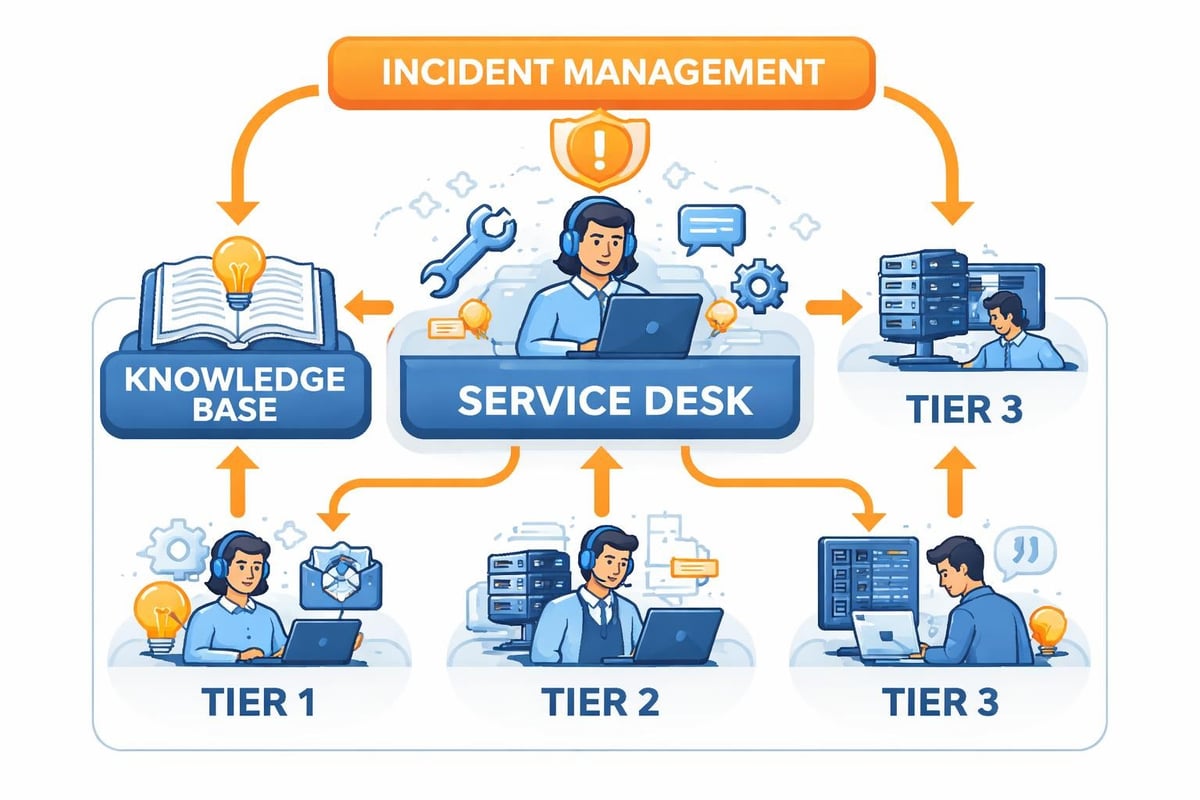
These components don't exist in isolation. They interconnect to create a responsive ecosystem where information flows between teams, issues get routed to appropriate specialists, and patterns emerge that help prevent future problems.
Service Desk Structure and Support Tiers
Organizations structure their support services IT operations using tiered models that match expertise levels with problem complexity. This approach ensures efficient resource utilization while maintaining service quality.
| Support Tier | Responsibilities | Typical Resolution Time | Expertise Level |
|---|---|---|---|
| Tier 1 | Password resets, basic troubleshooting, ticket creation | 15-30 minutes | Entry-level technicians |
| Tier 2 | Advanced troubleshooting, software configuration, network issues | 2-4 hours | Experienced IT specialists |
| Tier 3 | Complex problems, infrastructure issues, vendor escalations | 1-3 days | Senior engineers, architects |
| Tier 4 | Vendor support, specialized third-party assistance | Variable | External experts |
First contact resolution (FCR) represents a critical metric for support services IT effectiveness. When Tier 1 technicians resolve issues during the initial interaction, businesses save time and money while users experience minimal disruption. The NetGain Technologies approach emphasizes prioritizing FCR through comprehensive training and empowering front-line staff with decision-making authority.
Implementing Tiered Support Successfully
Creating distinct support tiers requires more than organizational charts. Successful implementation depends on clear escalation criteria, documented procedures, and ongoing skill development.
Tier 1 technicians need access to robust knowledge bases containing step-by-step resolution guides for common issues. When they encounter problems beyond their scope, well-defined escalation paths ensure seamless handoffs to higher tiers. Regular training sessions help Tier 1 staff expand their capabilities, gradually improving FCR rates over time.
Organizations should establish service level agreements (SLAs) that define response and resolution timeframes for each tier. These commitments create accountability while setting realistic user expectations. Establishing clear SLAs helps support teams prioritize work and allocate resources effectively.
Proactive vs Reactive Support Models
Traditional support services IT operated reactively-waiting for users to report problems before taking action. Modern organizations increasingly adopt proactive models that identify and resolve issues before users notice them.
Reactive support characteristics include:
- Users discover problems first
- Support teams respond to incoming tickets
- Focus on rapid incident resolution
- Limited capacity planning
- Higher emergency response costs
Proactive support characteristics include:
- Monitoring systems detect anomalies automatically
- Support teams address issues before impact occurs
- Focus on prevention and optimization
- Strategic capacity planning based on trends
- Reduced emergency incidents and associated costs
The shift toward proactive support services IT requires investment in monitoring tools, automation platforms, and analytical capabilities. However, the return on investment typically materializes quickly through reduced downtime, improved user satisfaction, and lower support costs. Managed IT services exemplify this proactive approach by continuously monitoring systems, performing preventative maintenance, and addressing potential issues before they disrupt business operations.
Monitoring and Alerting Systems
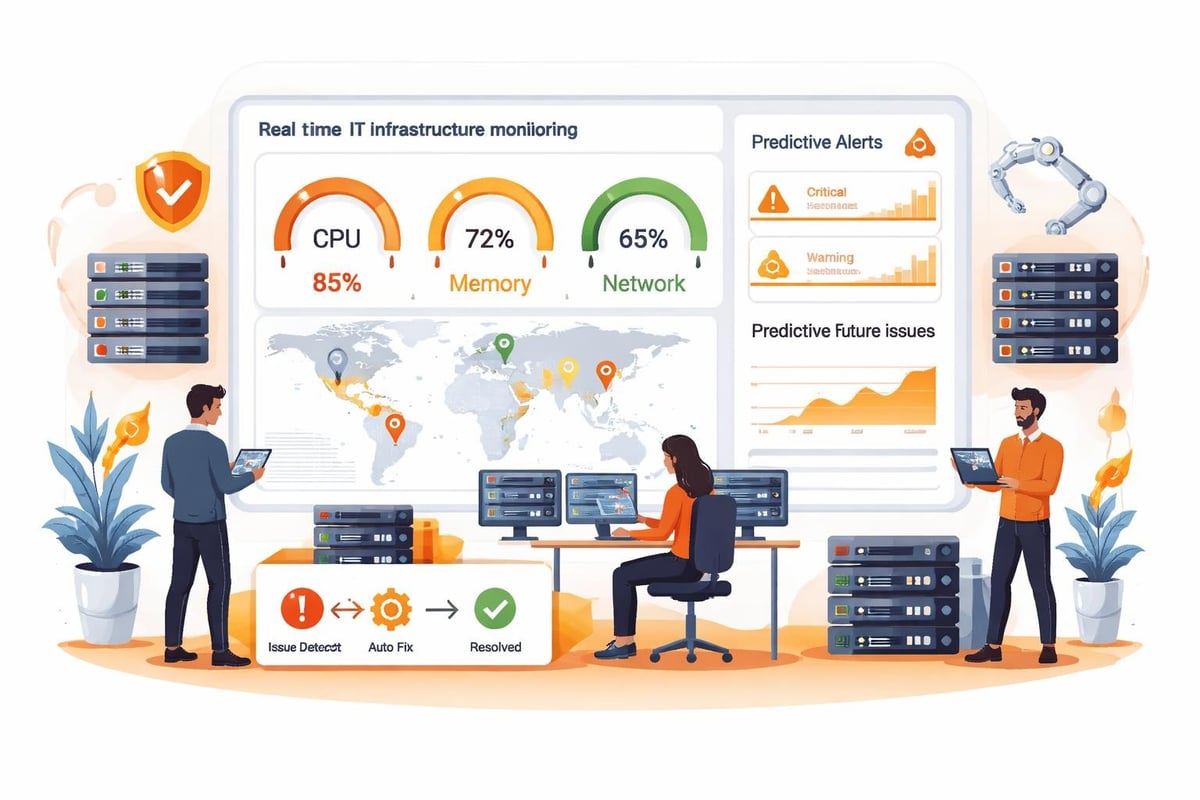
Proactive support depends on comprehensive monitoring covering servers, networks, applications, and endpoints. Modern monitoring platforms collect performance metrics, log data, and user behavior patterns to establish baselines and detect deviations.
When monitoring systems identify potential issues-disk space approaching capacity, unusual network traffic patterns, or application performance degradation-they trigger alerts based on predefined thresholds. Sophisticated platforms use machine learning to reduce false positives and predict failures before they occur.
Best Practices for IT Service Management
Implementing support services IT effectively requires adherence to proven best practices that optimize both user experience and operational efficiency. The Technology Services Industry Association research highlights emerging trends including AI-driven support and delivery model optimization that forward-thinking organizations are adopting.
Automation and Self-Service
Automation eliminates repetitive manual tasks, freeing support staff to focus on complex problems requiring human judgment. Password resets, software installations, and account provisioning represent ideal automation candidates. ITSM best practices emphasize automation as essential for scaling support operations without proportional staff increases.
Self-service portals empower users to resolve common issues independently through searchable knowledge bases, video tutorials, and automated workflows. When users successfully self-serve, support ticket volumes decrease while user satisfaction often increases due to immediate resolution.
Knowledge Management
Effective support services IT operations capture institutional knowledge systematically rather than leaving it scattered across individual technician memories. Knowledge-Centered Service (KCS) methodology, as discussed in Screendesk's IT support best practices, emphasizes creating and maintaining knowledge articles during the problem-resolution process.
Each time technicians solve novel problems, they document the symptoms, diagnostic steps, and solutions in centralized knowledge bases. Over time, these repositories become increasingly valuable, enabling faster resolution and supporting self-service initiatives.
| Knowledge Management Activity | Frequency | Responsibility | Impact |
|---|---|---|---|
| Article creation during ticket resolution | Per incident | All technicians | Immediate |
| Article review and updates | Monthly | Senior staff | Medium-term |
| Knowledge base reorganization | Quarterly | Management | Long-term |
| User feedback integration | Ongoing | Knowledge managers | Continuous |
Continuous Improvement Culture
Support services IT organizations committed to excellence embrace continuous improvement methodologies. Regular service reviews analyze metrics including ticket volume, resolution times, customer satisfaction scores, and recurring issues.
When patterns emerge-specific applications generating disproportionate support requests, particular user groups experiencing repeated issues, or certain times showing volume spikes-teams investigate root causes and implement systemic improvements. This approach, emphasized in Salesforce ITSM best practices, transforms support from a cost center into a strategic function that enhances overall business performance.
Security Integration in Support Services
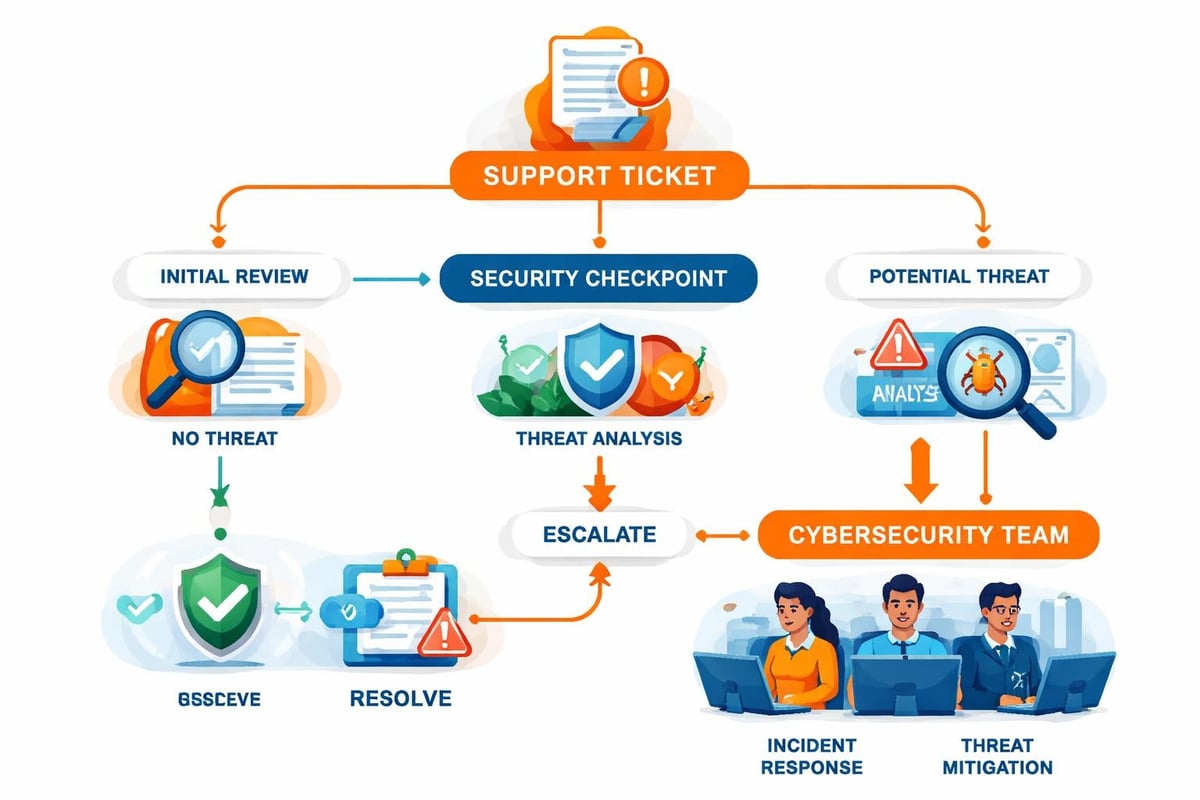
Support services IT and cybersecurity increasingly converge as security threats grow more sophisticated. Support teams serve as front-line defenders, identifying potential security incidents during routine troubleshooting.
Security Awareness Training
Support technicians require training to recognize security indicators-unusual access patterns, suspicious email attachments, unauthorized software installations, or social engineering attempts. When support staff understand security principles, they catch threats that automated systems might miss.
Organizations should implement security protocols within support workflows. Before resetting passwords or granting access, technicians verify user identities through multiple authentication factors. When users report potential security incidents, support teams follow documented escalation procedures to engage security specialists immediately.
Compliance and Documentation
Many industries face regulatory requirements affecting how support services IT handles data, documents incidents, and maintains records. Healthcare organizations must comply with HIPAA, financial institutions with SOX, and companies processing European data with GDPR.
Support teams need clear guidance on compliance requirements affecting their daily work. Documentation standards ensure audit trails exist for access requests, configuration changes, and security incidents. The Standard of Good Practice for Information Security provides comprehensive guidelines for managing information security risks across support operations.
Measuring Support Services Performance
Effective support services IT management requires measuring the right metrics and using data to drive improvements. While many organizations track basic statistics like ticket volume and average resolution time, sophisticated support operations monitor broader indicators of service quality and business impact.
Essential Support Metrics
Response time measures how quickly support teams acknowledge new requests. Even when immediate resolution isn't possible, prompt acknowledgment reassures users that their issues receive attention.
Resolution time tracks how long problems remain open from initial report to final closure. Organizations typically measure this separately for each support tier and issue category.
Customer satisfaction (CSAT) scores capture user perceptions of support quality through post-interaction surveys. While subjective, CSAT provides valuable insights into whether support services meet user expectations.
First contact resolution rate indicates the percentage of issues resolved during initial contact without escalation or follow-up. Higher FCR rates correlate with better user experiences and lower support costs.
Ticket backlog reveals whether support capacity matches demand. Growing backlogs signal understaffing, inadequate processes, or systemic problems requiring attention.
Advanced Performance Indicators
Beyond basic metrics, mature support services IT organizations track indicators that reveal operational health and strategic alignment:
- Mean time to repair (MTTR) for critical systems
- Change success rate measuring implementation quality
- Knowledge base utilization showing self-service effectiveness
- Cost per ticket indicating operational efficiency
- Repeat ticket rate highlighting unresolved underlying issues
Regular performance reviews should examine these metrics holistically rather than in isolation. A low average resolution time means little if customer satisfaction scores decline or repeat tickets increase.
Remote Support Capabilities
The evolution of work patterns, particularly the increase in remote and hybrid arrangements since 2020, has transformed support services IT requirements. Organizations need robust remote support capabilities that deliver the same quality assistance regardless of user location.
Remote Support Technologies
Modern remote support platforms enable technicians to view user screens, control systems remotely, transfer files, and communicate through integrated chat or voice channels. These tools eliminate the need for physical presence while often enabling faster resolution than on-site visits.
Successful remote support implementation requires:
- Secure remote access protocols protecting data during support sessions
- Reliable connectivity ensuring consistent support availability
- User-friendly interfaces minimizing technical barriers
- Comprehensive logging maintaining audit trails
- Integration with ticketing systems streamlining workflows
Balancing Security and Accessibility
Remote support creates potential security vulnerabilities if not properly controlled. Organizations must balance accessibility with protection by implementing multi-factor authentication, session recording, and access restrictions based on least-privilege principles.
The KR Group's IT help desk best practices recommend implementing tiered support systems that extend to remote capabilities, ensuring appropriate expertise levels handle different issue types regardless of user location.
Vendor Management and Third-Party Support
Few organizations maintain completely self-sufficient support services IT operations. Most rely on vendor relationships for specialized hardware support, software assistance, and infrastructure services.
Effective vendor management ensures external support integrates seamlessly with internal operations. Service level agreements with vendors should align with internal SLAs, preventing situations where vendor delays prevent meeting user commitments.
Coordinating Internal and External Support
Support teams need clear procedures for engaging vendor support-knowing when to escalate, what information vendors require, and how to track external cases. Creating dedicated vendor liaison roles within support organizations often improves coordination and reduces resolution times.
Organizations should maintain vendor contact directories, escalation procedures, and support entitlement documentation in accessible locations. When critical issues occur, support teams shouldn't waste time searching for vendor contact information or determining whether support contracts cover specific problems.
Training and Development for Support Staff
Support services IT quality depends heavily on staff capabilities. Organizations must invest in ongoing training covering technical skills, soft skills, and business knowledge.
Technical Skills Development
Technology evolves rapidly, requiring continuous learning to maintain support effectiveness. Training programs should address:
- New software and applications deployed within the organization
- Emerging security threats and protective measures
- Updated troubleshooting methodologies
- Platform-specific certifications (Microsoft, Cisco, CompTIA)
- Industry trends and best practices
Many organizations implement certification requirements for support staff, ensuring baseline competencies while encouraging professional development.
Customer Service Skills
Technical expertise alone doesn't guarantee support success. The customer experience focus emphasized in modern support operations requires technicians who communicate clearly, demonstrate empathy, and manage user expectations effectively.
Support staff training should include conflict resolution, active listening, clear communication techniques, and stress management. These soft skills often differentiate adequate support from exceptional service.
Budget Planning for Support Services
Support services IT represents a significant ongoing investment requiring careful budget planning. Organizations must balance service quality expectations with financial constraints while planning for growth and technology evolution.
| Budget Category | Typical Allocation | Considerations |
|---|---|---|
| Personnel | 60-70% | Salaries, benefits, training, certifications |
| Technology | 15-25% | Tools, monitoring platforms, ticketing systems |
| Vendor support | 10-15% | Hardware maintenance, software support contracts |
| Infrastructure | 5-10% | Help desk space, equipment, telecommunications |
When building support budgets, organizations should consider projected ticket volumes, service level commitments, technology complexity, and user population growth. Underinvesting in support services IT typically results in longer resolution times, frustrated users, and potentially costly system failures that adequate support might have prevented.
Organizations that invest strategically in support services IT position themselves for sustained technology success, enabling employees to work productively while protecting critical business systems. Whether you're looking to establish comprehensive support capabilities, improve existing operations, or transition to proactive technology management, partnering with experienced providers delivers expertise and resources that many businesses struggle to maintain internally. Starcomm Technologies offers fast, friendly, and reliable IT support tailored to Toronto businesses, helping organizations leverage technology effectively while focusing on their core competencies.